Wednesday, June 19, 2013

Add borders in SharePoint 2007 list view

Sometime we get some requirement to add some styles in SharePoint list views. Yesterday, I got it from CEO that he wants to add lines in between each list item in all lists in his Team Site. I tried to add following CSS style on the page by following Heather Solomon guide but for some reason it was not working for me. http://bit.ly/11mXRAd

/*Set border for every row */
.ms-listviewtable > tbody > tr td{
border-bottom: 1px solid #AFAFAF !important; /* !important needed over override SharePoint inline style */
}


Initially sample list was look like this.
 

image
 

I added few lines of jQuery on the page and it started look like this.
 

image
 

Following is the code I used to do this.


<script src="http://code.jquery.com/jquery-latest.js"></script>
<script type="text/javascript">

$(document).ready(function(){
$("td:empty").html('&nbsp;');

var $listView = $('.ms-listviewtable .ms-vb2 ');
$listView.attr( 'style', 'border-bottom: 1px solid black !important');

var $listView1 = $('.ms-listviewtable .ms-vb-title');
$listView1.attr( 'style', 'border-bottom: 1px solid black!important');

var $listViewTable = $('.ms-listviewtable');

$listViewTable.attr('style', 'border-collapse: collapse !important');

});
</script>

Thursday, June 13, 2013

Read column value for a list item programmatically

While reading list item’s column value using code, we get exception if column is empty/ null. To avoid such exception, we can use this line of code while reading column value.

if (item["ColumnInternalName"] != null && SPEncode.HtmlEncode(item["ColumnInternalName"].ToString()) != string.Empty && !string.IsNullOrEmpty(item["ColumnInternalName"].ToString()))
{
ImageFieldValue image = (ImageFieldValue)item["ColumnInternalName"];
imageURL = image.ImageUrl;
}
else
{
imageURL = "/_layouts/images/icon.png";
}


Tuesday, December 11, 2012

SharePoint Saturday Dubai 2012

2012_SPS_Logo_300

SharePoint Saturday Dubai 2012 is on the head. Please join us on December 15, 2012 to meet SharePoint MVPs, Architects, Administrators, Developers, Business Users and Professionals who work with SharePoint tools and technologies.

Visit here for more details: http://www.sharepointsaturday.org/dubai

SharePoint Saturday Dubai 2012 is proudly brought to you by Dubai SharePoint Geeks,SPGeekslogo

Wednesday, November 7, 2012

Download SharePoint 2013 Pre-requisites in one go

When I started installation of SharePoint Server 2013 RTM on Windows Server 2012 virtual machine, I got an error screen showing that I have to install pre-requisites for SharePoint 2013.

ErrorScreen

I found a very nice blog post where all downloadable links for required pre-requisites software are listed. Have a look at here. http://blogs.msdn.com/b/ocarpen/archive/2012/07/31/sharepoint-2013-preview-pre-requisites-download-links.aspx

In the above mentioned blog post, another post is mentioned where I found a cool PowerShell script which downloads all required software for me automatically. I just need to run that script and after some time, all required components will be downloaded in desired location on my disk. URL for this post is http://wellytonian.com/2012/07/sharepoint-2013-pre-requisites-downloader/

I am posting that script here too in case (for any reason) that blog post is removed. Copy this script and paste in a PS1 file and run it with PowerShell.

###############SharePoint 2013 Pre Requisite Software Downloader############
############################################################################
###Author: Aben Samuel####Date:27/10/2012###################################
##########Version:2#########################################################
#####URL#####EDIT IF Microsoft Makes Changes to the URL#####################
$UrlList = ("http://download.microsoft.com/download/1/E/3/1E3220BD-1D17-4EE7-8D7F-333422D1BA4B/enu_netfx/x64/netfx_full_x64.msi", # Microsoft .NET Framework 4.5
"http://download.microsoft.com/download/5/2/B/52B59966-3009-4F39-A99E-3732717BBE2A/Windows6.1-KB2506143-x64.msu", # Windows Management Framework 3.0 (CTP2)
"http://download.microsoft.com/download/9/1/3/9138773A-505D-43E2-AC08-9A77E1E0490B/1033/x64/sqlncli.msi", #Microsoft SQL Server 2008 r2 Native Client
"http://download.microsoft.com/download/D/7/2/D72FD747-69B6-40B7-875B-C2B40A6B2BDD/Windows6.1-KB974405-x64.msu", #Windows Identity Foundation (KB974405)
"http://download.microsoft.com/download/E/0/0/E0060D8F-2354-4871-9596-DC78538799CC/Synchronization.msi", # Microsoft Sync Framework Runtime v1.0 SP1 (x64)
"http://download.microsoft.com/download/A/6/7/A678AB47-496B-4907-B3D4-0A2D280A13C0/WindowsServerAppFabricSetup_x64.exe", #Windows Server AppFabric
"http://download.microsoft.com/download/0/1/D/01D06854-CA0C-46F1-ADBA-EBF86010DCC6/r2/MicrosoftIdentityExtensions-64.msi", # Windows Identity Extensions
"http://download.microsoft.com/download/9/1/D/91DA8796-BE1D-46AF-8489-663AB7811517/setup_msipc_x64.msi", # Microsoft Information Protection and Control Client
"http://download.microsoft.com/download/8/F/9/8F93DBBD-896B-4760-AC81-646F61363A6D/WcfDataServices.exe", # Microsoft WCF Data Services 5.0
"http://download.microsoft.com/download/7/B/5/7B51D8D1-20FD-4BF0-87C7-4714F5A1C313/AppFabric1.1-RTM-KB2671763-x64-ENU.exe" # CU Package 1 for Microsoft AppFabric 1.1 for Windows Server (KB2671763)
)
####Destination Directory for the files to be downloaded######################
$DestPath = "C:\SP2013B2"
######################################DO NOT EDIT BELOW THIS LINE##################################################
###################################################################################################################
Write-Warning "Executing Script"
##Importing Bits Module######
Import-Module BitsTransfer
Write-Host
######HouseKeeping#################################################################################################
###################################################################################################################
Remove-Item $DestPath -recurse -erroraction SilentlyContinue
New-Item $DestPath -type directory -erroraction SilentlyContinue
"Folder Created"
Write-Host
## Check that the path entered is valid
If (Test-Path "$DestPath" -Verbose)
{
## If destination path is valid, create folder if it doesn't already exist
$DestFolder = "$DestPath\PrerequisiteInstallerFiles"
New-Item -ItemType Directory $DestFolder -ErrorAction SilentlyContinue
}
Else
{
Write-Warning " - Destination path appears to be invalid."
## Pause
Write-Host " - Please check the path, and try running the script again."
Write-Host "- Press any key to exit..."
$null = $host.UI.RawUI.ReadKey("NoEcho,IncludeKeyDown")
break
}
#########Downloading#################################################################################################
#####################################################################################################################
ForEach ($Url in $UrlList)
{
$DestFileName = $Url.Split('/')[-1]
Try
{
If (!(Test-Path "$DestFolder\$DestFileName"))
{
## Start the download process
Start-BitsTransfer -Source $Url -Destination $DestFolder\$DestFileName -DisplayName "Downloading `'$DestFileName`' to $DestFolder" -Priority High -Description "From $Url..." -ErrorVariable err
If ($err) {Throw ""}
}
Else
{
Write-Host " - File $DestFileName already exists, skipping..."
}
}
Catch
{
Write-Warning " - An error occurred downloading `'$DestFileName`'. Check whether Internet connectivity is enabled on this device"
break
}
}
Write-Host "- Downloads completed"
Invoke-Item $DestFolder
Write-Warning "Press any key to exit"
$null = $host.UI.RawUI.ReadKey("NoEcho,IncludeKeyDown")

I ran this script using PowerGUI and here is screenshot.
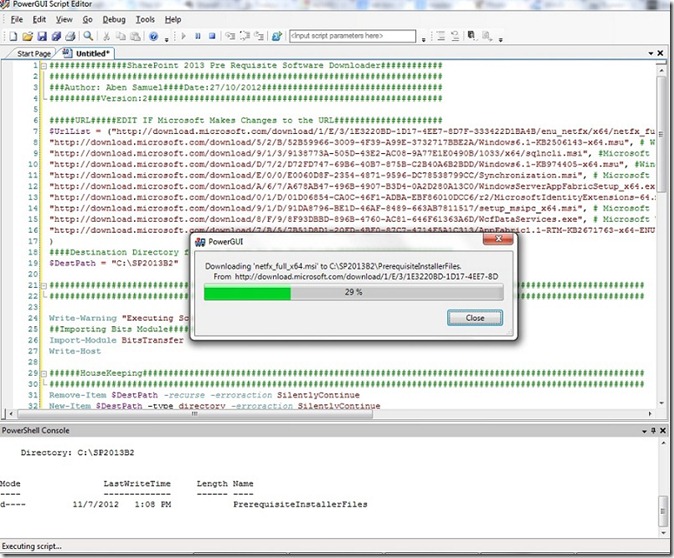
script

All downloaded executable are here in this folder.

files

Tuesday, October 30, 2012

Copy all list items with attachments to other list(s) programmatically

Sometime, we find requirement from business to create a copy of a SharePoint list with all its contents including all attachments. If size of list is larger and we try to save list as a template with its contents, it gives error.

To do this task, we need to write little code which will copy all list items to the destination list. To execute code below successfully, it is necessary that both lists have same schema. To achieve it, follow these steps,

  • Save destination list as a template.
  • Create a new list using template we just created.
  • Copy this code in our Visual Studio and supply correct Site URLs and list names. We can change variables and parameters as per our requirement.
  • Run the code on SharePoint Server.

            string SourceSiteUrl = "http://SPServer";
            string DestSiteUrl = "
http://SPServer/sites/CEO_Office";   
           
            string SourceListName = "Source List";   
            string DestinationListName = "Destination List";  
           
            SPSite SourceSite = new SPSite(SourceSiteUrl);  
            SPWeb SourceWeb = SourceSite.RootWeb;  
            SPList sourceList = SourceWeb.Lists[SourceListName];
           
            SPSite DestSite = new SPSite(DestSiteUrl);   
            SPWeb DestWeb = DestSite.RootWeb;     
            SPList destList = destWeb.Lists[DestinationListName]; 
           
            foreach (SPListItem sourceItem in sourceList.Items) 
            {                      
                SPListItem newDestItem = destList.Items.Add(); 
                foreach (SPField field in sourceList.Fields) 
                {                          
                    if (!field.ReadOnlyField && field.Type != SPFieldType.Attachments)
                    {   
                        newDestItem[field.InternalName] = sourceItem[field.InternalName]; 
                    }      
                }                      
                newDestItem.Update();   

                if (sourceItem.Attachments.Count > 0) 
                {                          
                    SPFolder sourceItemAttachFolder = sourceItem.Web.Folders["Lists"].SubFolders[sourceItem.ParentList.Title].SubFolders["Attachments"].SubFolders[sourceItem.ID.ToString()];  
                   
                    foreach (SPFile file in sourceItemAttachFolder.Files)  
                    {                           
                        byte[] binFile = file.OpenBinary();       
                        newDestItem.Attachments.AddNow(file.Name, binFile);
                    }                
                }           
            }
           
            destList.Update();
            Console.WriteLine(destList.Title + " updated successfully.");

This code will copy all list items with all attachments to the destination list. Using this code, we can create copies of lists in other site collections too. This code will fail if both source and destinations lists would have different schema.


Monday, October 15, 2012

Deleting a TFS Task

If you need to delete a TFS task, run this command,
witadmin.exe destroywi /Collection:<TFS url> /id:<Task id>
where TFS url == Team Project Collection URL  &
Task id == Task ID that is assigned by TFS
In this case, I am deleting a task with ID 31 where URL of project collection is “http:\\test-tfs-srv01:8080\tfs\DefaultCollection”

image


Tuesday, June 7, 2011

Execute code after Asynchronous postbacks

When we use ASP.NET UpdatePanel in our application and do postbacks, it results asynchronous postbacks from controls inside UpdatePanel which don’t trigger window.load() or jQuery’s $(document).ready() methods. To run a method after asynchronous postback, we need to use Sys.WebForms.PageRequestManager. It has add_endRequest() method which allows to attach method to this event which will run after asynchronous postbacks.
To do this, add these lines in your javascript code.
Sys.WebForms.PageRequestManager.getInstance().add_endRequest(loadText);

function loadText() {

// Add your code which will run after Asynchronous postback.

}

If you are doing something on window.load() or $(document).ready() event and want to execute it after postbacks from controls residing inside UpdatePanel, copy that in your asynchronous postback event handler(s) as well.

For attaching a method with Page Load event, we can use

Sys.WebForms.PageRequestManager.getInstance().add_pageLoaded(eventHandler);