Showing posts with label SharePoint 2010. Show all posts

Thursday, February 12, 2015

Error in opening Office documents in client application in SharePoint

I was getting an error while opening word or excel documents stored in SharePoint libraries. When I was clicking on document title, instead of opening in client application, it was opening a browser windows with file url starting with ms-word:ofv|u| or ms-excel:ofv|u| etc where it was displayed, “The webpage cannot be displayed”.

ms-word:ofv|u|http://testsite.mydomain.com/sites/Corporate/IT/Reports/ecm%20training%20material.docx

image

I found the settings in document library for opening in client application were already set to “open in client application” but still error was coming.

image


I found that I am using Office 2010 however I have also Visio 2013 and Project 2013 installed on this machine. After some search, I found that there is a conflict in “Microsoft SharePoint Foundation Support” components when we use 2 different Office versions. In my case, I am using Office 2010 and Office 2013.

To resolve the issue, I went to “Uninstall or change a program” option in Control Panel and select Visio 2013 and click on Change Button.

image

In next window, I chose “Add or Remove Features” and clicked on Continue button.

image

In “Installation Options” screen, I clicked on “Microsoft SharePoint Foundation Support” and make it unavailable. I made sure that all components in this category were also unavailable.

image

Then, I clicked “Continue” and complete the process.

I repeated this process for Project 2013 and finally I repaired Office 2010 installation.

After completion of repair, everything was okay and I was able to open office files in client applications.

image

Hope it will help you.

Monday, February 9, 2015

Unknown SQL Exception 87 occurred. Additional error information from SQL Server is included below. Event ID: 5586 for SharePoint

If your SharePoint stops working and it throws ASP.NET yellow error screen and you find error in event viewer with EventID : 5586, it means your SharePoint virtual machines are unable to connect with SQL Server.

Here is detail of error.

“Event ID: 5586

Source: SharePoint Foundation (Microsoft-SharePoint Products-SharePoint Foundation)

Unknown SQL Exception 87 occurred. Additional error information from SQL Server is included below.

A network-related or instance-specific error occurred while establishing a connection to SQL Server. The server was not found or was not accessible. Verify that the instance name is correct and that SQL Server is configured to allow remote connections. (provider: SQL Network Interfaces, error: 25 - Connection string is not valid)”

To fix this issue, follow the steps.

1. Open SQL Server Configuration Manager, expand SQL Server Network Configuration and select protocols for your SQL instance.

image

2. Right click on TCP/IP, disable it and enable it again.

3. Select SQL Server Services and restart SQL Server service for your instance. If you are running SQL Server cluster, then restart SQL Server service from there.

image

4. Finally, restart all your SharePoint machines.

Once, SharePoint machines will come back, SharePoint will be back on track.

Thanks to my friend Adnan Khan for help finding the solution.

Happy SharePointing!

Wednesday, November 26, 2014

Stop forcefully SharePoint Search Crawl through PowerShell

Sometime, it happens that we want to stop search crawl but from Central Administration Site, Stop Crawl link doesn’t work. To stop Search Crawl forcefully in SharePoint, we can use this script.

Get-SPEnterpriseSearchCrawlContentSource -SearchApplication "Search Service Application" | ForEach-Object {
    if ($_.CrawlStatus -ne "Idle")
    {
        Write-Host "Stopping : Crawl is currently running for content source $($_.Name)..."
        $_.StopCrawl()
    }
}

Monday, May 26, 2014

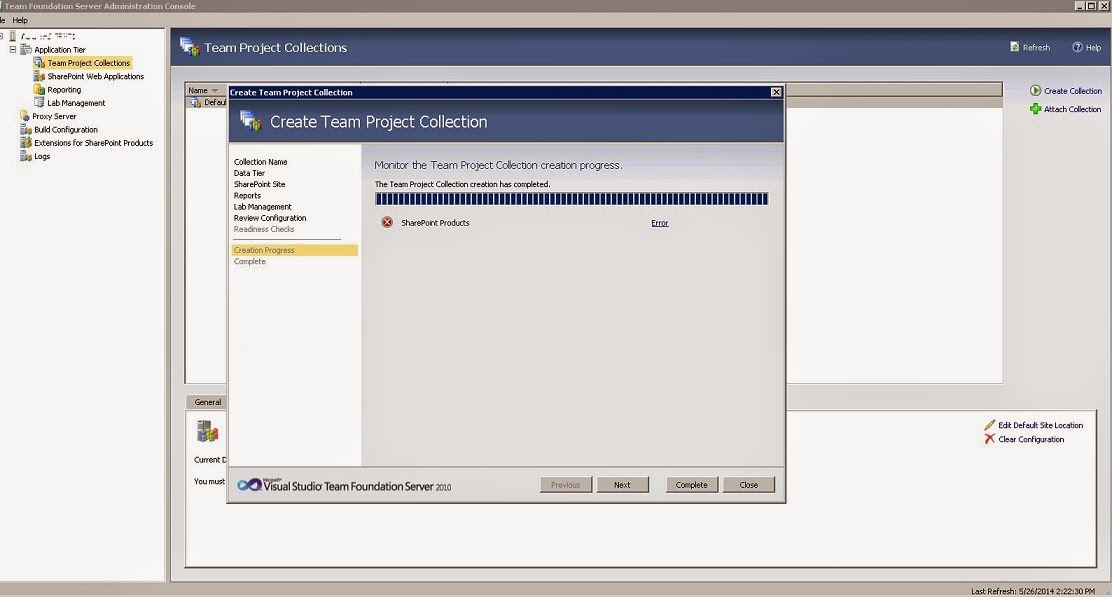
TF250001: The validation check failed for the following account: NT AUTHORITY\NETWORK SERVICE


While creating new Team Project Collection in Team Foundation Server, if you receive error for SharePoint, make sure that you have added NT AUTHORITY\NETWORK SERVICE as farm administrator in your SharePoint central administration site for Team Foundation Server.

I got this error.

"[Error] TF252031: A SharePoint site could not be created for the team project collection. The following error occurred: TF250001: The validation check failed for the following account: NT AUTHORITY\NETWORK SERVICE. The account must be a member of the Farm Administrators group for the following SharePoint Web application: http://test-tfs-srv01:9000/. For more information, see the Microsoft Web site (http://go.microsoft.com/fwlink/?LinkId=161206)."


After adding "NT AUTHORITY\NETWORK SERVICE" as farm administrator, team project collection got created successfully.


Wednesday, April 30, 2014

SQL remote blob storage must be installed on each web front end server and on the content database before it may be used.


While enabling Remote Blob Storage on SharePoint servers, we need to run these PowerShell commands to enable RBS.

$cdb = Get-SPContentDatabase WSS_Content_5000  #Set you database name
$rbss = $cdb.RemoteBlobStorageSettings
$rbss.Installed()
$rbss.Enable()
$rbss.SetActiveProviderName($rbss.GetProviderNames()[0])


When you run this line $rbss.Enable(), sometimes we get error and it says, “SQL remote blob storage must be installed on each web front end server and on the content database before it may be used.”


To resolve this problem, we need to restart all servers in the Farm. After restarting, it will work like a charm.

Thursday, June 13, 2013

Read column value for a list item programmatically

While reading list item’s column value using code, we get exception if column is empty/ null. To avoid such exception, we can use this line of code while reading column value.

if (item["ColumnInternalName"] != null && SPEncode.HtmlEncode(item["ColumnInternalName"].ToString()) != string.Empty && !string.IsNullOrEmpty(item["ColumnInternalName"].ToString()))
{
ImageFieldValue image = (ImageFieldValue)item["ColumnInternalName"];
imageURL = image.ImageUrl;
}
else
{
imageURL = "/_layouts/images/icon.png";
}


Tuesday, December 11, 2012

SharePoint Saturday Dubai 2012

2012_SPS_Logo_300

SharePoint Saturday Dubai 2012 is on the head. Please join us on December 15, 2012 to meet SharePoint MVPs, Architects, Administrators, Developers, Business Users and Professionals who work with SharePoint tools and technologies.

Visit here for more details: http://www.sharepointsaturday.org/dubai

SharePoint Saturday Dubai 2012 is proudly brought to you by Dubai SharePoint Geeks,SPGeekslogo

Tuesday, October 30, 2012

Copy all list items with attachments to other list(s) programmatically

Sometime, we find requirement from business to create a copy of a SharePoint list with all its contents including all attachments. If size of list is larger and we try to save list as a template with its contents, it gives error.

To do this task, we need to write little code which will copy all list items to the destination list. To execute code below successfully, it is necessary that both lists have same schema. To achieve it, follow these steps,

  • Save destination list as a template.
  • Create a new list using template we just created.
  • Copy this code in our Visual Studio and supply correct Site URLs and list names. We can change variables and parameters as per our requirement.
  • Run the code on SharePoint Server.

            string SourceSiteUrl = "http://SPServer";
            string DestSiteUrl = "
http://SPServer/sites/CEO_Office";   
           
            string SourceListName = "Source List";   
            string DestinationListName = "Destination List";  
           
            SPSite SourceSite = new SPSite(SourceSiteUrl);  
            SPWeb SourceWeb = SourceSite.RootWeb;  
            SPList sourceList = SourceWeb.Lists[SourceListName];
           
            SPSite DestSite = new SPSite(DestSiteUrl);   
            SPWeb DestWeb = DestSite.RootWeb;     
            SPList destList = destWeb.Lists[DestinationListName]; 
           
            foreach (SPListItem sourceItem in sourceList.Items) 
            {                      
                SPListItem newDestItem = destList.Items.Add(); 
                foreach (SPField field in sourceList.Fields) 
                {                          
                    if (!field.ReadOnlyField && field.Type != SPFieldType.Attachments)
                    {   
                        newDestItem[field.InternalName] = sourceItem[field.InternalName]; 
                    }      
                }                      
                newDestItem.Update();   

                if (sourceItem.Attachments.Count > 0) 
                {                          
                    SPFolder sourceItemAttachFolder = sourceItem.Web.Folders["Lists"].SubFolders[sourceItem.ParentList.Title].SubFolders["Attachments"].SubFolders[sourceItem.ID.ToString()];  
                   
                    foreach (SPFile file in sourceItemAttachFolder.Files)  
                    {                           
                        byte[] binFile = file.OpenBinary();       
                        newDestItem.Attachments.AddNow(file.Name, binFile);
                    }                
                }           
            }
           
            destList.Update();
            Console.WriteLine(destList.Title + " updated successfully.");

This code will copy all list items with all attachments to the destination list. Using this code, we can create copies of lists in other site collections too. This code will fail if both source and destinations lists would have different schema.


Monday, March 21, 2011

“The language of this installation package is not supported by your system.”, Error while installing SharePoint 2010 on Windows 7.

Today, I was setting my development environment up on Windows 7 and was following this blog post for installing SharePoint 2010 on Windows 7. After extracting SharePointServer.exe for modifying config.xml to allow SharePoint setup on client OS, when I ran setup.exe, it gave me this error. “The language of this installation package is not supported by your system.”

2011-03-20_1915

I extracted SharePointServer.exe using WinRar and it created 156 items in SharePointServer folder.

4

However, when I extracted SharePointServer.exe in command line using extract switch, it created 30 items in SPFiles folder. Then it worked perfect and now I am running a fine installation of SharePoint 2010 on Windows 7.

Here C:\ is location where SharePointServer.exe is located and C:\SPFles is destination folder where files got extracted. So command is SharePointserver /extract:C:\SPFiles.

1

2

3

Saturday, March 5, 2011

Check if Web Application exists using PowerShell in SharePoint

To check if a web application exists in SharePoint environment using PowerShell, use this script.

Add-PsSnapin Microsoft.SharePoint.PowerShell

[void][System.Reflection.Assembly]::LoadWithPartialName(“Microsoft.SharePoint”)

$WebAppName = "IntranetPortal80"
$sp = Get-SPWebApplication | Where {$_.DisplayName -eq $WebAppName}
if($sp -eq $null)
{

        Write-host "Null"
}
else
{
        write-host "No Null"
}

In, if-else block do what you want to do.

Wednesday, January 26, 2011

Get list of all users of a SharePoint Web Application using PowerShell

To get a list of all users of a SharePoint web application in PowerShell, we can use get-spuser cmdlet. This cmdlet should be used with SPWeb object.

To get all users in a web application use this PowerShell command. It will include all users in all site collections of web application.

Get-SPWebApplication http://sp2010:2000 | Get-SPSite | Get-SPWeb | Get-SPUser

UserLogin                                DisplayName
---------                                  -----------
DS\expsah                              DS\expsah
SHAREPOINT\system               System Account
DS\expsah                              DS\expsah
NT AUTHORITY\auth...             NT AUTHORITY\auth
NT AUTHORITY\LOCA...            Salman Mn1 Ahmad
SHAREPOINT\system               System Account
DS\expsah                              DS\expsah
NT AUTHORITY\auth...             NT AUTHORITY\auth
NT AUTHORITY\LOCA...            Salman Mn1 Ahmad
SHAREPOINT\system               System Account
DS\expsah                              DS\expsah
NT AUTHORITY\auth...             NT AUTHORITY\auth
NT AUTHORITY\LOCA...            Salman Mn1 Ahmad
SHAREPOINT\system               System Account

Friday, January 7, 2011

SharePoint Saturday Lahore : Registrations Now Open!

clip_image002

As you may or may not be aware, for the first time there is a SharePoint Saturday event coming up in Lahore – Pakistan on the March 26th, 2011. 

It is with great pleasure that I announce to you that registrations for the first SharePoint Saturday Lahore are now open.

A great opportunity to connect with the SharePoint community of Pakistan,  we are planning on having some great sessions, speakers from SharePoint. Come and see a variety of speakers from all over Pakistan and the world.

To register to attend this event, please click here and fill out the details. This ensures your place and adequate catering for the event. The event is FREE to attend and we would love to have you there supporting the event, allowing us to put on more SharePoint Saturday events here in Lahore in the future.

The SharePoint Saturday Website is: http://www.sharepointsaturday.org/Lahore

Please follow @SPSLahore on Twitter, keep track of the #SPSLHE hash tag on Twitter and link with SPSLahore on Facebook to keep up to date with announcements.

For your queries, please contact the #SPSLahore committee by sending an email to spslahore[at]hotmail.com.

Thanks,

Saturday, November 27, 2010

Free SharePoint Tools for download

SharePoint Resource Center has maintained a list of freely available SharePoint tools. These tools are quite useful while working with SharePoint. You can have a look here.

Tools

Thursday, November 25, 2010

“The form cannot be rendered. This may be due to a misconfiguration of the Microsoft SharePoint Server State Service.”, Error while publishing a page in SharePoint 2010.

        When I tried to submit a publishing page after editing to publish, I got this error, “The form cannot be rendered. This may be due to a misconfiguration of the Microsoft SharePoint Server State Service. For more information, contact your server administrator”.
Error
This was because State Service was not configured in my SharePoint environment.
WithoutStateService
To configure State Service, I run the following PowerShell script.


Add-PsSnapin Microsoft.SharePoint.PowerShell 
$serviceApp = New-SPStateServiceApplication -Name "State Service" New-SPStateServiceDatabase -Name "StateServiceDatabase" -ServiceApplication 
$serviceApp New-SPStateServiceApplicationProxy -Name "State Service" -ServiceApplication $serviceApp –DefaultProxyGroup


I added this script in a text file and saved it as script.ps1 on my C drive. Then I opened command prompt and ran this command.
C:\>Powershell C:\script.ps1
After running this script, my State Service was configured and I published my page successfully.
WithStateService

Wednesday, November 17, 2010

Error occurred in deployment step 'Recycle IIS Application Pool': Cannot connect to the SharePoint site. Error occurs while deploying SharePoint solution.

In Visual Studio 2010 while deploying SharePoint solutions, sometime we see this error

“Error occurred in deployment step 'Recycle IIS Application Pool': Cannot connect to the SharePoint site. If you moved this project to a new computer or if the URL of the SharePoint site has changed since you created the project, update the Site URL property of the project.”

RunningProjectURL error

This is because we forgot to mention the Site URL where we are going to deploy this solution. After specifying site URL, deployment went well.

SpecifySiteURL

Site URL will be your SharePoint site i.e. http://spdev:2000.

Saturday, November 13, 2010

List of Content Types’ IDs in SharePoint 2010

This list provides an overview of Content Types in SharePoint 2010 with their IDs. Content Type ID is essential for maintaining inheritance of Content Types.

Content Type Name

ID

Administrative Task

0x010802

Announcement

0x0104

Approval Workflow Task (en-US)

0x01080100C9C9515DE4E24001905074F980F93160003A15057E2AF34B67B32E14B94EB70409

Article Page

0x010100C568DB52D9D0A14D9B2FDCC96666E9F2007948130EC3DB064584E219954237AF3900242457EFB8B24247815D688C526CD44D

Audio

0x0101009148F5A04DDD49CBA7127AADA5FB792B006973ACD696DC4858A76371B2FB2F439A

Basic Page

0x010109

Circulation

0x01000F389E14C9CE4CE486270B9D4713A5D6

Collect Feedback Workflow Task (en-US)

0x01080100C9C9515DE4E24001905074F980F93160000EEA96BE7C83464C9211129CD27F0409

Collect Signatures Workflow Task (en-US)

0x01080100C9C9515DE4E24001905074F980F93160002E9DB43AC527439AB853AE4FC8360409

Comment

0x0111

Contact

0x0106

Discussion

0x012002

Document

0x0101

Document Collection Folder

0x0120D5

DomainGroup

0x010C

Dublin Core Columns

0x01010B

East Asia Contact

0x0116

Enterprise Wiki Page

0x010100C568DB52D9D0A14D9B2FDCC96666E9F2007948130EC3DB064584E219954237AF39004C1F8B46085B4D22B1CDC3DE08CFFB9C

Event

0x0102

Folder

0x0120

Form

0x010101

Health Analyzer Report

0x0100F95DB3A97E8046B58C6A54FB31F2BD46

Health Analyzer Rule Definition

0x01003A8AA7A4F53046158C5ABD98036A01D5

Holiday

0x01009BE2AB5291BF4C1A986910BD278E4F18

Image

0x0101009148F5A04DDD49CBA7127AADA5FB792B00AADE34325A8B49CDA8BB4DB53328F214

Issue

0x0103

Item

0x01

Link

0x0105

Link to a Document

0x01010A

List View Style

0x010100734778F2B7DF462491FC91844AE431CF

Master Page

0x010105

Message

0x0107

New Word

0x010018F21907ED4E401CB4F14422ABC65304

Office Data Connection File

0x010100629D00608F814DD6AC8A86903AEE72AA

Official Notice

0x01007CE30DD1206047728BAFD1C39A850120

Page

0x010100C568DB52D9D0A14D9B2FDCC96666E9F2007948130EC3DB064584E219954237AF39

Page Layout

0x01010007FF3E057FA8AB4AA42FCB67B453FFC100E214EEE741181F4E9F7ACC43278EE811

Page Output Cache

0x010087D89D279834C94E98E5E1B4A913C67E

Person

0x010A

Phone Call Memo

0x0100807FBAC5EB8A4653B8D24775195B5463

Picture

0x010102

Post

0x0110

Project Page

0x010100C568DB52D9D0A14D9B2FDCC96666E9F2007948130EC3DB064584E219954237AF39004C1F8B46085B4D22B1CDC3DE08CFFB9C

0055EF50AAFF2E4BADA437E4BAE09A30F8

Published Link

0x01004613D6562E4C41A7B9DADDAC1689E00D

Publishing Approval Workflow Task (en-US)

0x01080100C9C9515DE4E24001905074F980F9316000A245BAB39C6543159300E33084BA0409

Publishing Master Page

0x0101000F1C8B9E0EB4BE489F09807B2C53288F0054AD6EF48B9F7B45A142F8173F171BD1

Redirect Page

0x010100C568DB52D9D0A14D9B2FDCC96666E9F2007948130EC3DB064584E219954237AF3900FD0E870BA06948879DBD5F9813CD8799

Report Builder Model

0x010100D8704AF8ED734F4088724751E0F2727D

Report Builder Report

0x010100C3676CDFA2F24E1D949A8BF2B06F6B8B

Report Data Source

0x0101007DFDDF56F8A9492DAA9366B83A95B3A0

Reservations

0x0102004F51EFDEA49C49668EF9C6744C8CF87D

Resource

0x01004C9F4486FBF54864A7B0A33D02AD19B1

Resource Group

0x0100CA13F2F8D61541B180952DFB25E3E8E4

Reusable HTML

0x01002CF74A4DAE39480396EEA7A4BA2BE5FB

Reusable Text

0x01004D5A79BAFA4A4576B79C56FF3D0D662D

Rich Media Asset

0x0101009148F5A04DDD49CBA7127AADA5FB792B

RootOfList

0x012001

Rule

0x0100DC2417D125A4489CA59DCC70E3F152B2

Schedule

0x0102007DBDC1392EAF4EBBBF99E41D8922B264

Schedule and Reservations

0x01020072BB2A38F0DB49C3A96CF4FA85529956

SharePoint Server Workflow Task

0x01080100C9C9515DE4E24001905074F980F93160

SharePointGroup

0x010B

Signatures Workflow Task Deprecated

0x01080100C9C9515DE4E24001905074F980F9316001

Summary Task

0x012004

System

0x

System Master Page

0x0101000F1C8B9E0EB4BE489F09807B2C53288F

System Page

0x010100C568DB52D9D0A14D9B2FDCC96666E9F2

System Page Layout

0x01010007FF3E057FA8AB4AA42FCB67B453FFC1

Task

0x0108

Timecard

0x0100C30DDA8EDB2E434EA22D793D9EE42058

Universal Data Connection File

0x010100B4CBD48E029A4AD8B62CB0E41868F2B0

Unknown Document Type

0x010104

User Workflow Document

0x010107

Users

0x0100FBEEE6F0C500489B99CDA6BB16C398F7

Video

0x0101009148F5A04DDD49CBA7127AADA5FB792B00291D173ECE694D56B19D111489C4369D

Web Part Page

0x01010901

Welcome Page

0x010100C568DB52D9D0A14D9B2FDCC96666E9F2007948130EC3DB064584E219954237AF390064DEA0F50FC8C147B0B6EA0636C4A7D4

Page Layout Content Types

0x0100A2CA87FF01B442AD93F37CD7DD0943EB

Wiki Page

0x010108

Workflow History

0x0109

Workflow Task

0x010801

Friday, November 12, 2010

Check programmatically if List is already exists in SharePoint site


While programming with SharePoint Object Model, sometimes we are in situation where we need to check if a list is already exists in given scope especially or we should create a new list. We can check this by creating a list in a try block and if list already exists it will throw exception which will be handled in catch block. However we can check it by other couple of ways.

  • Check if lists exists.
       string listName = "Tasks";
    SPSite site = (SPSite)properties.Feature.Parent;
    SPWeb webName = site.RootWeb;
    bool isListExixts = webName.Lists.TryGetList(listName);
    if (isListExixts == true)
        // List Exists.

  • Iterate through collection of lists and match for each list with specified list name. 
   string listName = "Tasks";

SPSite site = (SPSite)properties.Feature.Parent;
SPWeb webName = site.RootWeb;
SPListCollection listCollection = webName.Lists;
foreach (SPList tempList in listCollection)
{
   if (tempList.Title == listName)
      return true;
}

  • Iterate through list of collection using this code.
   string listName = "Tasks";

SPSite site = (SPSite)properties.Feature.Parent;
SPWeb webName = site.RootWeb;
if(webName.Lists.Cast<SPList>().Any(list => list.Title.Equals(listName, StringComparison.OrdinalIgnoreCase)))
{
   return true;
}


In both ways, code looks into List collection and if Task list is already exists it returns true.

Wednesday, November 10, 2010

Create Web Application, Site Collection and Sub Sites through PowerShell in SharePoint 2010

        This is time to manage SharePoint Server Farms using PowerShell and to say goodbye to STSADM. SharePoint Administrators are learning PowerShell and are writing scripts for their environments. Here is a script for Creating Web Application, Site Collection and multiple sub sites in one go.

1. Create a .ps1 file and add reference for PowerShell and SharePoint Assemblies.
Add-PsSnapin Microsoft.SharePoint.PowerShell
[void][System.Reflection.Assembly]::LoadWithPartialName(“Microsoft.SharePoint”)
2. Set variables and create Web Application.
#Create Web Application 
Write-Output " "
Write-Output "Creating Web Application for Intranet Portal."
$AppName = "Intranet Portall"
$AppPool = "IntranetPortalApplicationPool"
$UserAccount = "winsmarts\sp_admin"
$Port = 80
$DBServer = "SPDEV\SQL_SERVER"
$DBName = "IntranetPortalDatabase_80"
New-SPWebApplication -Name $AppName -Port $Port  -ApplicationPool $AppPool
-ApplicationPoolAccount (Get-SPManagedAccount $UserAccount) -databaseserver $DBServer -databasename $DBName 
Write-Output " "
Write-Output "Web Application Created Successfully."
3. Create Site Collection.
Write-Output " "
Write-Output "Creating Top Site Collection"
# Set variables  
$SiteCollectionName = "Test Portal" 
$SiteCollectionURL = "http://SPDEV:80" 
$SiteCollectionTemplate = "STS#0" 
$SiteCollectionLanguage = 1033  
$SiteCollectionOwner = "winsmarts\Administrator" 
# Create a new Sharepoint Site Collection  
New-SPSite -URL $SiteCollectionURL -OwnerAlias $SiteCollectionOwner -Language $SiteCollectionLanguage
-Template $SiteCollectionTemplate -Name $SiteCollectionName 
Write-Output " "
Write-Output "Top Site Collection created successfully."
4. Create sub sites.
#Creating Sub Sites in top site collection.
Write-Output " "
Write-Output "Creating Sub Sites"
$SubSites = @("Central Services", "Knowledge Base", "Service Center", "IT", "HR", "Finance")
for($i=0 ; $i -lt $SubSites.count ; $i++)
{
clear-variable -name siteurl
$SiteUrl = $SiteCollectionURL += "/" 
$SiteUrl = $SiteUrl += $SubSites[$i]
Write-Output " "
#Write-Output "Creating Site for " += $SubSites[$i]
Write-Output " "
New-SPWeb $SiteUrl -Template $SiteCollectionTemplate -Name $SubSites[$i]  -UseParentTopNav
-Language $SiteCollectionLanguage
Write-Output " "
#Write-Output "Site Created for " += $SubSites[$i]
Write-Output " "
}
 

Sunday, November 7, 2010

“There was a problem retrieving data for this field. Updating values in this field is disabled temporarily. You can still update values in other fields.”, Error while editing User Profile in SharePoint 2010.

When I tried to edit my User Profile in SharePoint 2010, I found some properties disabled with this error, “There was a problem retrieving data for this field. Updating values in this field is disabled temporarily. You can still update values in other fields." This is because Managed Metadata Service Application Proxy’s properties were not properly set.

Error1

Error2

To resolve this issue, I opened Managed Metadata Service Application Proxy’s properties.

ProxyServiceSetting1

And check first two option.

1. This service application is the default storage location for Keywords.

2. This service application is the default storage location for column specific term sets.

MetadataProp

MetaDataProp2

After clicking OK, when I again tried to edit my User Profile properties, everything was working fine.

Sol1

Sol2

Thanks to my friend Andreas B.Iversen for telling me this tip.

Monday, November 1, 2010

Create custom User Profile properties in SharePoint 2010 reading from XML file

We create custom User Profile properties quite often in SharePoint. User Profile properties are created easily in Central Administration web site however while developing large enterprise solutions, direct access to production servers are not usually available to developers. To achieve such goals, we usually develop console applications which runs during deployment script or develop features which execute code during feature activation. User Profile properties can be created in SharePoint development environment using Microsoft.Office.Server.UserProfiles namespace. A simple XML file containing details of required custom properties can be used as input. Here is sample XML which I created for this example.
<Properties Server="http://flhsrv116" TermStore="Managed Metadata Service Application Proxy">
<Property>
<Name>Audience</Name>
<DisplayName>Audience</DisplayName>
<!-- Collection of Values for Type Node : (big integer | binary | boolean | date | date no year | date time | Email | float | unique identifier | HTML | integer | Person | string | string (Single Value) | string (Multi Value) | Time Zone | URL)  -->
<Type>string (Multi Value)</Type>
<!-- IsMultiValue : Possible Options true | false :  Note = Only true when Type = String (Multi Value) -->
<IsMultiValue>true</IsMultiValue>
<TermStoreGroup>DSG</TermStoreGroup>
<TermSet>Audiences</TermSet>
</Property>

<Property>
<Name>DateofJoining</Name>
<DisplayName>Date of Joining</DisplayName>
<!-- Collection of Values for Type Node : (big integer | binary | boolean | date | date no year | date time | Email | float | unique identifier | HTML | integer | Person | string | string (Single Value) | string (Multi Value) | Time Zone | URL)  -->
<Type>date</Type>
<!-- IsMultiValue : Possible Options true | false -->
<IsMultiValue>false</IsMultiValue>
<TermStoreGroup>null</TermStoreGroup>
<TermSet>null</TermSet>
</Property>
</Properties>

In this simple example, I am creating two properties. One is of date type and second is of term set type. This XML file has a root node with two attributes and two child nodes. Each child node represent a custom property. Property’s name, display name, type and other properties can be configured as mentioned above. At the moment, we have only one custom property of term set type in User Profile store.

Properties1

To do this, create a console application in Visual Studio 2010.
Add references of System.Xml, Microsoft.Office.Server.UserProfiles, Microsoft.SharePoint and Microsoft.SharePoint.Taxonomy if term set type value is required to create.
Add this code in .cs file.


using System;
using Microsoft.Office.Server.UserProfiles;
using Microsoft.SharePoint;
using Microsoft.SharePoint.Taxonomy;
using System.Xml;
using System.Collections;

namespace UserProfilesOMApp
{
class Program
{
static void Main(string[] args)
{
string str = "UserProfileProperties.xml";

// Reading XML document.

XmlDocument doc = new XmlDocument();
doc.Load(str);

// Reading Parent node of document.
XmlNode xmlNode = doc.DocumentElement;
XmlNodeList propertiesxmlnodeList = doc.GetElementsByTagName("Properties");

// Reading Attributes for parent node.
XmlElement xmlElement = (XmlElement)propertiesxmlnodeList.Item(0);

string servername = xmlElement.GetAttribute("Server");
string termstore = xmlElement.GetAttribute("TermStore");

// Reading property node and its Child node lists.
XmlNodeList propertyxmlnodeList = doc.GetElementsByTagName("Property");
XmlNodeList namelist = doc.GetElementsByTagName("Name");
XmlNodeList displaynamelist = doc.GetElementsByTagName("DisplayName");
XmlNodeList typelist = doc.GetElementsByTagName("Type");
XmlNodeList ismultivaluelist = doc.GetElementsByTagName("IsMultiValue");
XmlNodeList termsetlist = doc.GetElementsByTagName("TermSet");
XmlNodeList termstoregrouplist = doc.GetElementsByTagName("TermStoreGroup");


string propertyname = null;
string displayname = null;
string type = null;
string ismultivalue = null;
string termstoregroup = null;
string termset = null;

using (SPSite site = new SPSite(servername))
{

for(int x = 0; x < propertyxmlnodeList.Count; x++)
{

propertyname = namelist.Item(x).InnerText.ToString();
displayname = displaynamelist.Item(x).InnerText.ToString();
type = typelist.Item(x).InnerText.ToString();
ismultivalue = ismultivaluelist.Item(x).InnerText.ToString();
termstoregroup = termstoregrouplist.Item(x).InnerText.ToString();
termset = termsetlist.Item(x).InnerText.ToString();

// Method call for creating a user profile property.
Program.createProfileProperties(site, termstore, propertyname, displayname, type, ismultivalue, termstoregroup, termset);               
}
}
}

static void createProfileProperties(SPSite site, string termstore, string propertyname, string displayname, string type, string ismultivalue, string termstoregroup, string termset)
{

SPServiceContext context = SPServiceContext.GetContext(site);
UserProfileConfigManager upcm = new UserProfileConfigManager(context);

try
{
ProfilePropertyManager ppm = upcm.ProfilePropertyManager;
Console.WriteLine("Creating Propoerty");
// Create core property.
CorePropertyManager cpm = ppm.GetCoreProperties();
CoreProperty coreproperty = cpm.GetPropertyByName(propertyname);

// Check if property already exists.
if (coreproperty != null)
{
Console.WriteLine("Property already exists......");
return;                    
}

CoreProperty cp = cpm.Create(false);
cp.Name = propertyname;
cp.DisplayName = displayname;
//Get Property Type from Enumeration.
PropertyDataTypeCollection pdtc = upcm.GetPropertyDataTypes();
PropertyDataType ptype = null;
IEnumerator enumType = pdtc.GetEnumerator();
while (enumType.MoveNext())
{
ptype = (PropertyDataType)enumType.Current;
if (ptype.Name.ToString().ToLower().Equals(type.ToString().ToLower())) break;
}

cp.Type = ptype.Name;

if(type.ToLower() == "string (Multi Value)".ToLower())
{
cp.IsMultivalued = Convert.ToBoolean(ismultivalue);
if (ismultivalue.ToLower() == "true".ToLower())
{
cp.Separator = MultiValueSeparator.Semicolon;
}

// Set the TermSet.
TaxonomySession taxonomySession = new TaxonomySession(site);
TermStore termStore = taxonomySession.TermStores[termstore];
Group group = termStore.Groups[termstoregroup];
TermSet termSet = group.TermSets[termset];

cp.TermSet = termSet;
}

cpm.Add(cp);

// Create profile type property.
ProfileTypePropertyManager ptpm = ppm.GetProfileTypeProperties(ProfileType.User);
ProfileTypeProperty ptp = ptpm.Create(cp);
ptp.IsVisibleOnViewer = true;
ptp.IsVisibleOnEditor = true;

ptpm.Add(ptp);

// Create profile subtype property.
ProfileSubtypeManager psm = ProfileSubtypeManager.Get(context);
ProfileSubtype ps = psm.GetProfileSubtype(ProfileSubtypeManager.GetDefaultProfileName(ProfileType.User));

ProfileSubtypePropertyManager pspm = ps.Properties;        

ProfileSubtypeProperty psp = pspm.Create(ptp);

psp.PrivacyPolicy = PrivacyPolicy.OptIn;
psp.DefaultPrivacy = Privacy.NotSet;


pspm.Add(psp);

Console.WriteLine("\nuser profile property "+ displayname + " created successfully.\n");
Console.ReadKey();
}
catch (DuplicateEntryException e)
{
Console.WriteLine(e.Message);
Console.Read();
}
catch (System.Exception e2)
{
Console.WriteLine(e2.Message);
Console.Read();
}
}
}
}

After running this code, this output will come.

Output

Now, in User Profile store, two custom properties has been added.

Properties
Download project solution as zip file.