Monday, March 16, 2015

List Templates are not visible in SharePoint 2013

Sometime you try to create lists in SharePoint 2013 site but you find that only 3 list templates in Noteworthy section are appearing all other list templates including custom list templates.

1

It is happening because in your master page, a contentplaceholder named “PlaceHolderPageTitleInTitleArea” is set to visible = false.

2

All you need to do is to edit your master page in SharePoint Designer 2013 and search for “PlaceHolderPageTitleInTitleArea” and  change it  to Visible = “True” and publish the master page.

3

And after this everything is as expected.

4

Hope, it will help.

Saturday, March 7, 2015

The name ‘InitializeControl’ does not exist in this context. SharePoint 2013 Visual Web Part development

While developing Visual Web Parts for SharePoint 2013 using Visual Studio 2012, suddenly you may get an error. “The name ‘InitializeControl’ does not exist in this context”.

1

To fix this error quickly, select user control file (.ascx) of visual web part in Visual Studio and check if its property Custom Tool = SharePointWebPartCodeGenerator.

2

Also make sure that Site URL property of your project is set properly.

Then, right click on user control (.ascx) of visual web part and click on “Run Custom Tool”. It will fix all issues with .ascx.g.cs file and you will be good to go.

3

Saturday, February 28, 2015

SharePoint Dubai User Group Meeting – February 25, 2015

SharePoint Dubai User Group meeting held on February 25th, 2015.

Here are some highlights of the meeting.

Abdul Hafeez Jamali talked about Nintex workflow for SharePoint 2013 and he showed how quickly and how efficiently non-tech business users can develop workflows to automate their business process. It was a long session with briefing about product details, best practices and then with a detailed demo.

Sohail Hanif discussed about eDiscovery feature available in SharePoint 2013, how to setup eDiscovery center in SharePoint site and how business can leverage the functionality.

At the end, there was a quick meet and greet session over the pizza.

Thanks to Microsoft and Generix for sponsoring user group meeting.

SPDubai-Feb 25-1

Thursday, February 12, 2015

Error in opening Office documents in client application in SharePoint

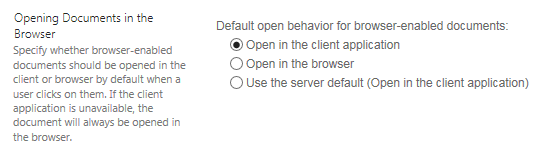
I was getting an error while opening word or excel documents stored in SharePoint libraries. When I was clicking on document title, instead of opening in client application, it was opening a browser windows with file url starting with ms-word:ofv|u| or ms-excel:ofv|u| etc where it was displayed, “The webpage cannot be displayed”.

ms-word:ofv|u|http://testsite.mydomain.com/sites/Corporate/IT/Reports/ecm%20training%20material.docx

image

I found the settings in document library for opening in client application were already set to “open in client application” but still error was coming.
image


I found that I am using Office 2010 however I have also Visio 2013 and Project 2013 installed on this machine. After some search, I found that there is a conflict in “Microsoft SharePoint Foundation Support” components when we use 2 different Office versions. In my case, I am using Office 2010 and Office 2013.

To resolve the issue, I went to “Uninstall or change a program” option in Control Panel and select Visio 2013 and click on Change Button.

image

In next window, I chose “Add or Remove Features” and clicked on Continue button.

image

In “Installation Options” screen, I clicked on “Microsoft SharePoint Foundation Support” and make it unavailable. I made sure that all components in this category were also unavailable.

image

Then, I clicked “Continue” and complete the process.

I repeated this process for Project 2013 and finally I repaired Office 2010 installation.

After completion of repair, everything was okay and I was able to open office files in client applications.

image

Hope it will help you.

Monday, February 9, 2015

Unknown SQL Exception 87 occurred. Additional error information from SQL Server is included below. Event ID: 5586 for SharePoint

If your SharePoint stops working and it throws ASP.NET yellow error screen and you find error in event viewer with EventID : 5586, it means your SharePoint virtual machines are unable to connect with SQL Server.

Here is detail of error.

Event ID: 5586

Source: SharePoint Foundation (Microsoft-SharePoint Products-SharePoint Foundation)

Unknown SQL Exception 87 occurred. Additional error information from SQL Server is included below.

A network-related or instance-specific error occurred while establishing a connection to SQL Server. The server was not found or was not accessible. Verify that the instance name is correct and that SQL Server is configured to allow remote connections. (provider: SQL Network Interfaces, error: 25 - Connection string is not valid)”

To fix this issue, follow the steps.

1. Open SQL Server Configuration Manager, expand SQL Server Network Configuration and select protocols for your SQL instance.

image

2. Right click on TCP/IP, disable it and enable it again.

3. Select SQL Server Services and restart SQL Server service for your instance. If you are running SQL Server cluster, then restart SQL Server service from there.

image

4. Finally, restart all your SharePoint machines.

Once, SharePoint machines will come back, SharePoint will be back on track.

Thanks to my friend Adnan Khan for help finding the solution.

Happy SharePointing!

Sunday, February 8, 2015

SharePoint Dubai User Group Meeting – February 11, 2015

SharePoint Dubai User Group meeting has been scheduled on February 11, 2015. All members and visitors are invited to attend.

Here are some highlights of the meeting agenda.

Adnan Khan and Salman Ahmad will be talking about how to set up a perfect Production environment for SharePoint 2013.

Here are main points of the presentation.

  • Prerequisite
  • Capacity Planning
  • Licensing Requirement
  • High-Availability
  • Database Services Requirement
  • Setup SharePoint Farm
  • Backup & Restore

At the end, there will be a chance to meet SharePointers working in UAE to meet and greet over the pizza.

Thanks to Microsoft and Generix for sponsoring user group meeting.

SPDubai-Feb11

Tuesday, January 20, 2015

SharePoint Dubai User Group Meeting – January 27, 2015

SharePoint Dubai User Group meeting has been scheduled on January 27, 2015. All members and visitors are invited to attend.

Here are some highlights of the meeting agenda.

Shakir Majeed Khan will be talking about how to develop and utilize workflows in business using SharePoint 2013. Where Salman Ahmad will be speaking about SharePoint 2013 capabilities to develop an ECM solution for the corporate. At the end, there will be a chance to meet SharePointers working in UAE to meet and greet over the pizza.

Thanks to Microsoft and Generix for sponsoring user group meeting.

SPDubai-Jan27-1