Wednesday, April 22, 2015

SharePoint Dubai User Group Meeting – April 22, 2015

SharePoint Dubai User Group meeting has been scheduled for April 22, 2015. All members and visitors are invited to attend.

Here are some highlights of the meeting agenda.

Sohail Hanif will talk about KWizCom Forms solutions with live demo.

Bassam Darras will be taking first session of his series for SharePoint 2013 and AngularJS development.

At the end, there will be a chance to meet SharePointers working in UAE to meet and greet over the pizza.

Thanks to Generix and KWizCom for sponsoring user group meeting.

SPDubai- April 22

Monday, April 20, 2015

SharePoint Dubai User Group Meeting – April 08, 2015

SharePoint Dubai User Group meeting held on April 08, 2015.

Here are some highlights of the meeting .

I talked about how to build taxonomy for ECM in SharePoint 2013 and what are the key improvements in SharePoint 2013 for ECM.

In second half, due to unforeseen reasons, our second speaker couldn’t attend however session turned into an open Q&A sessions related to SharePoint administration, development and future roadmap.

At the end, there was networking session over the pizza.

Thanks to Generix for sponsoring user group meeting.

SPDubai-April 08

Tuesday, March 24, 2015

SharePoint Saturday Abu Dhabi – March 14, 2015

On March 14, 2015, SharePoint Saturday (a renowned community event happening around the world and very attractive to people working with SharePoint) came to Abu Dhabi and it was the 2nd SPS event in Abu Dhabi. In Abu Dhabi, first SPS event was organized in October 2013.

Here is a brief introduction of SharePoint Saturday events.

“SharePoint Saturday is a free community‐focused SharePoint event dedicated to educating and engaging members of the local technical community. SharePoint Saturday draws upon the expertise of local, national, and international SharePoint IT professionals, developers and solutions architects who come together to share their real world experiences, lessons learned, best practices, and general knowledge with other like‐minded individuals.

SharePoint Saturday events are quickly gaining popularity across the world, with smaller regions averaging 100 – 175 attendees, and some locations seeing attendance figures over 300. As the event approaches we will share the registration numbers with sponsors in order to assist with staff planning and collateral quantities.”

For SPS Abu Dhabi, we got good number of attendees and got very good feedback about the contents delivered in the sessions. We thank you to all our speakers, sponsors and attendees who made this event a success.

clip_image001Web site address for global SharePoint Saturday is http://www.spsevents.org  where all upcoming and previous SharePoint Saturday events are listed. You can browse through the site and see list of previous events, speakers, sponsors and organizers. Url of site for SharePoint Saturday event in Abu Dhabi is http://www.spsevents.org/city/abudhabi/abudhabi2014 to find details of speakers, sessions, event location and sponsors and pictures at  https://www.facebook.com/spsabudhabi. Also you can find us on Twitter at @spsAbuDhabi.

Event venue was 2nd Floor Auditorium, Burjeel Hospital, Abu Dhabi. Here is the link for map. http://binged.it/1C3Eosq

Here is list of speakers and their sessions for the event.

clip_image003

Here is the list of sponsors who made possible for us to execute this event.

image 

Here is the list of SharePoint Saturday events were happening that time around the world.

clip_image005

Wednesday, March 18, 2015

SharePoint Dubai User Group Meeting – March 24, 2015

SharePoint Dubai User Group meeting has been scheduled for March 25, 2015. All members and visitors are invited to attend.

Here are some highlights of the meeting agenda.

I will be talking how to configure and manage Search topology for SharePoint 2013. It will include live demo of how to move Search components between servers.

Bassam Darras will speak how to use AngularJS and SharePoint APIs in SharePoint development.

At the end, there will be a chance to meet SharePointers working in UAE to meet and greet over the pizza.

Thanks to Generix for sponsoring user group meeting.

SPDubai-Mar 24-1

Monday, March 16, 2015

Error while updating data in Quick Edit view in SharePoint 2013 list

If you are updating contents in SharePoint 2013 list and you are getting this error message “Sorry, you can't create a new item with Quick Edit because this view is missing one or more required columns. To create a new item, please click "New Item" or add required columns to this view.”, you can fix this issue by doing these steps. While this error is occurring, we can add list items by clicking New Item button but Quick Edit doesn’t work.

image

In my case, I have a list named “Main Sections” and having only one default Title column but it is still not allowing me to do quick edit. To fix this issue, I open my site in SharePoint Designer 2013 and go select “List and Libraries” from left navigation. Then I select my list “Main Sections” and click on Edit Columns button in ribbon.

image

It will open list columns in Column tab as shown below.

image

Now, I select “Name” column and click on Administration Web Page button in Columns tab which opens Edit Column web page where I set “Require that this column contains information:” as No.

image

Once, I press OK, I will be redirected to list settings page. Then, I go to list and change its view as Quick Edit and start filling information by copy paste and it works without any issue.

image

This is list view after Quick Edit.

image

List Templates are not visible in SharePoint 2013

Sometime you try to create lists in SharePoint 2013 site but you find that only 3 list templates in Noteworthy section are appearing all other list templates including custom list templates.

1

It is happening because in your master page, a contentplaceholder named “PlaceHolderPageTitleInTitleArea” is set to visible = false.

2

All you need to do is to edit your master page in SharePoint Designer 2013 and search for “PlaceHolderPageTitleInTitleArea” and  change it  to Visible = “True” and publish the master page.

3

And after this everything is as expected.

4

Hope, it will help.

Saturday, March 7, 2015

The name ‘InitializeControl’ does not exist in this context. SharePoint 2013 Visual Web Part development

While developing Visual Web Parts for SharePoint 2013 using Visual Studio 2012, suddenly you may get an error. “The name ‘InitializeControl’ does not exist in this context”.

1

To fix this error quickly, select user control file (.ascx) of visual web part in Visual Studio and check if its property Custom Tool = SharePointWebPartCodeGenerator.

2

Also make sure that Site URL property of your project is set properly.

Then, right click on user control (.ascx) of visual web part and click on “Run Custom Tool”. It will fix all issues with .ascx.g.cs file and you will be good to go.

3

Saturday, February 28, 2015

SharePoint Dubai User Group Meeting – February 25, 2015

SharePoint Dubai User Group meeting held on February 25th, 2015.

Here are some highlights of the meeting.

Abdul Hafeez Jamali talked about Nintex workflow for SharePoint 2013 and he showed how quickly and how efficiently non-tech business users can develop workflows to automate their business process. It was a long session with briefing about product details, best practices and then with a detailed demo.

Sohail Hanif discussed about eDiscovery feature available in SharePoint 2013, how to setup eDiscovery center in SharePoint site and how business can leverage the functionality.

At the end, there was a quick meet and greet session over the pizza.

Thanks to Microsoft and Generix for sponsoring user group meeting.

SPDubai-Feb 25-1

Thursday, February 12, 2015

Error in opening Office documents in client application in SharePoint

I was getting an error while opening word or excel documents stored in SharePoint libraries. When I was clicking on document title, instead of opening in client application, it was opening a browser windows with file url starting with ms-word:ofv|u| or ms-excel:ofv|u| etc where it was displayed, “The webpage cannot be displayed”.

ms-word:ofv|u|http://testsite.mydomain.com/sites/Corporate/IT/Reports/ecm%20training%20material.docx

image

I found the settings in document library for opening in client application were already set to “open in client application” but still error was coming.

image


I found that I am using Office 2010 however I have also Visio 2013 and Project 2013 installed on this machine. After some search, I found that there is a conflict in “Microsoft SharePoint Foundation Support” components when we use 2 different Office versions. In my case, I am using Office 2010 and Office 2013.

To resolve the issue, I went to “Uninstall or change a program” option in Control Panel and select Visio 2013 and click on Change Button.

image

In next window, I chose “Add or Remove Features” and clicked on Continue button.

image

In “Installation Options” screen, I clicked on “Microsoft SharePoint Foundation Support” and make it unavailable. I made sure that all components in this category were also unavailable.

image

Then, I clicked “Continue” and complete the process.

I repeated this process for Project 2013 and finally I repaired Office 2010 installation.

After completion of repair, everything was okay and I was able to open office files in client applications.

image

Hope it will help you.

Monday, February 9, 2015

Unknown SQL Exception 87 occurred. Additional error information from SQL Server is included below. Event ID: 5586 for SharePoint

If your SharePoint stops working and it throws ASP.NET yellow error screen and you find error in event viewer with EventID : 5586, it means your SharePoint virtual machines are unable to connect with SQL Server.

Here is detail of error.

Event ID: 5586

Source: SharePoint Foundation (Microsoft-SharePoint Products-SharePoint Foundation)

Unknown SQL Exception 87 occurred. Additional error information from SQL Server is included below.

A network-related or instance-specific error occurred while establishing a connection to SQL Server. The server was not found or was not accessible. Verify that the instance name is correct and that SQL Server is configured to allow remote connections. (provider: SQL Network Interfaces, error: 25 - Connection string is not valid)”

To fix this issue, follow the steps.

1. Open SQL Server Configuration Manager, expand SQL Server Network Configuration and select protocols for your SQL instance.

image

2. Right click on TCP/IP, disable it and enable it again.

3. Select SQL Server Services and restart SQL Server service for your instance. If you are running SQL Server cluster, then restart SQL Server service from there.

image

4. Finally, restart all your SharePoint machines.

Once, SharePoint machines will come back, SharePoint will be back on track.

Thanks to my friend Adnan Khan for help finding the solution.

Happy SharePointing!

Sunday, February 8, 2015

SharePoint Dubai User Group Meeting – February 11, 2015

SharePoint Dubai User Group meeting has been scheduled on February 11, 2015. All members and visitors are invited to attend.

Here are some highlights of the meeting agenda.

Adnan Khan and Salman Ahmad will be talking about how to set up a perfect Production environment for SharePoint 2013.

Here are main points of the presentation.

  • Prerequisite
  • Capacity Planning
  • Licensing Requirement
  • High-Availability
  • Database Services Requirement
  • Setup SharePoint Farm
  • Backup & Restore

At the end, there will be a chance to meet SharePointers working in UAE to meet and greet over the pizza.

Thanks to Microsoft and Generix for sponsoring user group meeting.

SPDubai-Feb11

Tuesday, January 20, 2015

SharePoint Dubai User Group Meeting – January 27, 2015

SharePoint Dubai User Group meeting has been scheduled on January 27, 2015. All members and visitors are invited to attend.

Here are some highlights of the meeting agenda.

Shakir Majeed Khan will be talking about how to develop and utilize workflows in business using SharePoint 2013. Where Salman Ahmad will be speaking about SharePoint 2013 capabilities to develop an ECM solution for the corporate. At the end, there will be a chance to meet SharePointers working in UAE to meet and greet over the pizza.

Thanks to Microsoft and Generix for sponsoring user group meeting.

SPDubai-Jan27-1

Thursday, December 18, 2014

SharePoint courses available at Microsoft Virtual Academy

Microsoft Virtual Academy (MVA) is serving in a wonderful way and became an excellent resource for developers, IT Pros and end users.

What is MVA?

“Successful technologists never stop learning and great technology never stops evolving. Microsoft Virtual Academy (MVA) offers online Microsoft training delivered by experts to help technologists continually learn, with hundreds of courses, in 11 different languages. Our mission is to help developers, knowledgeable IT professionals and advanced students learn the latest technology, build their skills, and advance their careers. MVA is free of charge, and the entire service is hosted on Windows Azure.”

MVA is also providing courses on SharePoint which are quite useful for SharePoint professionals.

Course Name URL Published On
Office Guides: Apps for Office and SharePoint  http://www.microsoftvirtualacademy.com/training-courses/office-guides-apps-for-office-and-sharepoint 11/15/2013
Office Guides: SharePoint Online Overview for IT Pros  http://www.microsoftvirtualacademy.com/training-courses/office-guides-sharepoint-online-overview-for-it-pros 11/15/2013
Support Corner: Configure SharePoint Outbound Hybrid Search  http://www.microsoftvirtualacademy.com/training-courses/support-corner-configure-sharepoint-outbound-hybrid-search 9/29/2014
Tuning SQL Server 2012 for SharePoint 2013 Jump Start  http://www.microsoftvirtualacademy.com/training-courses/tuning-sql-server-2012-for-sharepoint-2013-jump-start

3/22/2013

Wednesday, November 26, 2014

“Could not find Stored Procedure Search_GetRepositoryTimePerCrawl” error in SharePoint 2013

In Crawl Log page of Search Service Application, when I clicked on Content Source “Local SharePoint Sites”, I got an error which said “"Could not find Stored Procedure Search_GetRepositoryTimePerCrawl”.

Search Servie Log

This was how Something went wrong screen look like.

SearchError

After searching on different sites, I found a solutions which suggests to check “Search Health Monitoring - Trace Events” Timer Job. When I checked it in Jobs Definitions page, I found it was disabled.

SearchTimerJobDisabled

After enabling and running the timer job, issue was resolved.

TimerJob

This is how Search Crawl Log page looks like

SearchLogs

Reference : http://www.wictorwilen.se/sharepoint-2013-fix-to-the-could-not-find-stored-procedure-search_getrepositorytimepercrawl-error

Stop forcefully SharePoint Search Crawl through PowerShell

Sometime, it happens that we want to stop search crawl but from Central Administration Site, Stop Crawl link doesn’t work. To stop Search Crawl forcefully in SharePoint, we can use this script.

Get-SPEnterpriseSearchCrawlContentSource -SearchApplication "Search Service Application" | ForEach-Object {
    if ($_.CrawlStatus -ne "Idle")
    {
        Write-Host "Stopping : Crawl is currently running for content source $($_.Name)..."
        $_.StopCrawl()
    }
}

Wednesday, November 19, 2014

DateTime picker issue in Nintex Forms

While customizing SharePoint Forms using Nintex Forms, we found that DateTime control in not displaying date in correct manner and form cannot be submitted if DateTime column is a mandatory field. Digits for month were being displayed twice.

1

After doing some search and a after a discussion with my good friend Vahid Taslimi who is Product Manager at Nintex, we started looking into locale and regional settings of SharePoint as it could be potential cause of this issue. We found that their is a conflict between locale settings of OS and locale settings of SharePoint site. When we opened regional settings of the site, we found that locale for the site is English (United States).

2

When we changed Locale from English (United States) to Arabic (U.A.E), issues with DateTime control was not there.

3

Here is the form after this change.

4

Sunday, November 16, 2014

Contents of emails disappeared in Nintex Workflows after SharePoint 2013 SP1 installation

After installing Service Pack 1 for SharePoint 2013, I found an issue with all workflows developed using Nintex Workflows 2013. For some reason, body of email notifications was not visible and it seems contents have been deleted.

image

Nintex Workflows 2013 was installed in June 2014 and that build is not compatible with SP1 for SharePoint 2013. After installing the latest build, issue got resolved and all text for emails are visible as earlier.

image

Monday, May 26, 2014

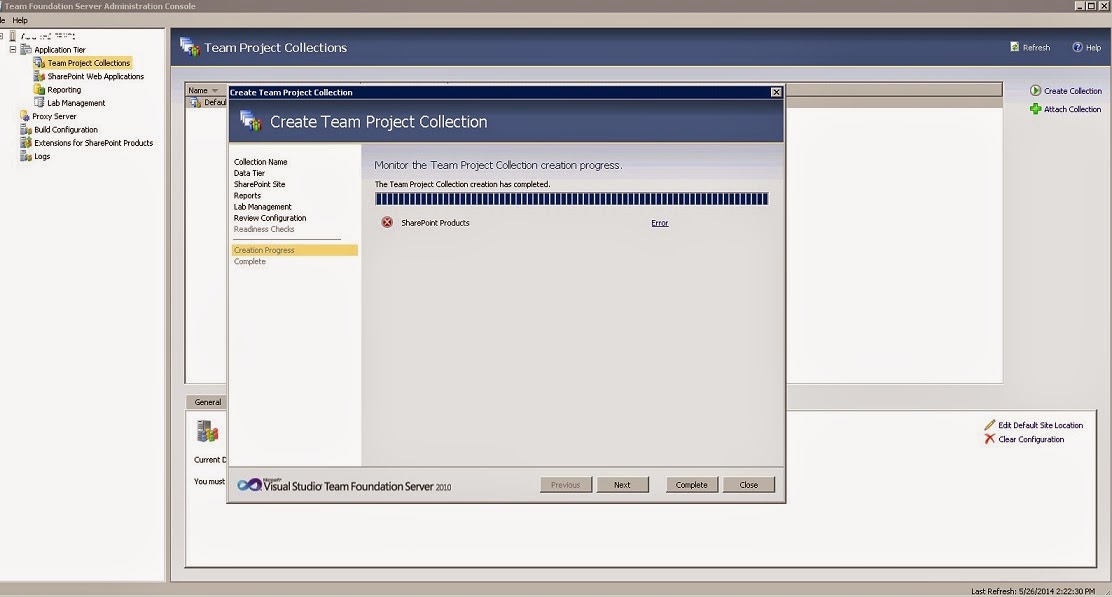
TF250001: The validation check failed for the following account: NT AUTHORITY\NETWORK SERVICE


While creating new Team Project Collection in Team Foundation Server, if you receive error for SharePoint, make sure that you have added NT AUTHORITY\NETWORK SERVICE as farm administrator in your SharePoint central administration site for Team Foundation Server.

I got this error.

"[Error] TF252031: A SharePoint site could not be created for the team project collection. The following error occurred: TF250001: The validation check failed for the following account: NT AUTHORITY\NETWORK SERVICE. The account must be a member of the Farm Administrators group for the following SharePoint Web application: http://test-tfs-srv01:9000/. For more information, see the Microsoft Web site (http://go.microsoft.com/fwlink/?LinkId=161206)."


After adding "NT AUTHORITY\NETWORK SERVICE" as farm administrator, team project collection got created successfully.


Wednesday, April 30, 2014

SQL remote blob storage must be installed on each web front end server and on the content database before it may be used.


While enabling Remote Blob Storage on SharePoint servers, we need to run these PowerShell commands to enable RBS.

$cdb = Get-SPContentDatabase WSS_Content_5000  #Set you database name
$rbss = $cdb.RemoteBlobStorageSettings
$rbss.Installed()
$rbss.Enable()
$rbss.SetActiveProviderName($rbss.GetProviderNames()[0])


When you run this line $rbss.Enable(), sometimes we get error and it says, “SQL remote blob storage must be installed on each web front end server and on the content database before it may be used.


To resolve this problem, we need to restart all servers in the Farm. After restarting, it will work like a charm.

Wednesday, June 19, 2013

Add borders in SharePoint 2007 list view

Sometime we get some requirement to add some styles in SharePoint list views. Yesterday, I got it from CEO that he wants to add lines in between each list item in all lists in his Team Site. I tried to add following CSS style on the page by following Heather Solomon guide but for some reason it was not working for me. http://bit.ly/11mXRAd

/*Set border for every row */
.ms-listviewtable > tbody > tr td{
border-bottom: 1px solid #AFAFAF !important; /* !important needed over override SharePoint inline style */
}


Initially sample list was look like this.
 

image
 

I added few lines of jQuery on the page and it started look like this.
 

image
 

Following is the code I used to do this.


<script src="http://code.jquery.com/jquery-latest.js"></script>
<script type="text/javascript">

$(document).ready(function(){
$("td:empty").html('&nbsp;');

var $listView = $('.ms-listviewtable .ms-vb2 ');
$listView.attr( 'style', 'border-bottom: 1px solid black !important');

var $listView1 = $('.ms-listviewtable .ms-vb-title');
$listView1.attr( 'style', 'border-bottom: 1px solid black!important');

var $listViewTable = $('.ms-listviewtable');

$listViewTable.attr('style', 'border-collapse: collapse !important');

});
</script>